
In the fast-moving world of AI, agentic AI is emerging as the next big step beyond traditional large language models (LLMs) and standard “copilot” assistants. Unlike a typical LLM that only responds when spoken to, an agentic AI can take autonomous actions towards a goal – it’s less a passive assistant and more an active problem-solver. This post will explain what agentic AI means, how it differs from well-known AI like ChatGPT, Google’s Gemini, or Microsoft’s standard Copilots, and how businesses can harness it using Microsoft Copilot Studio to build bespoke AI agents.
From LLMs to Agents: What’s the Difference?
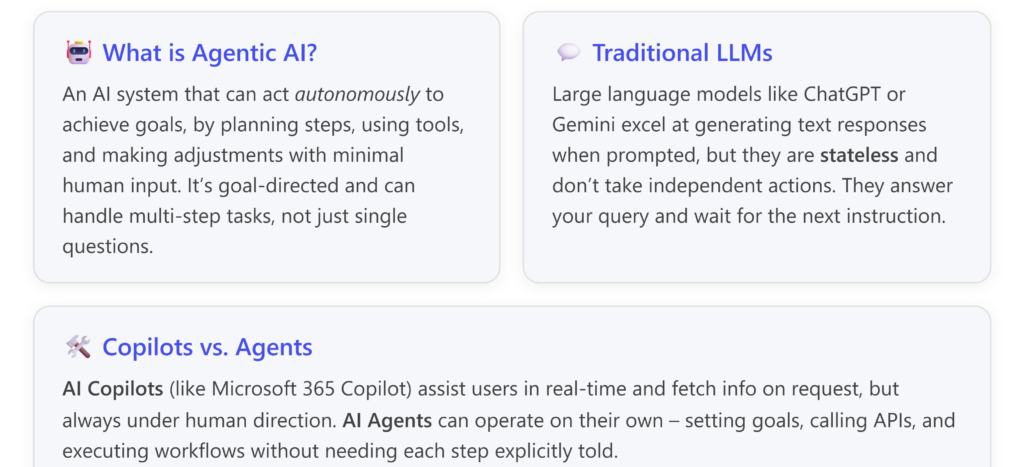
Traditional LLMs (such as OpenAI’s ChatGPT or Google’s Gemini) are powerful at understanding language and producing responses. You give a prompt, they give an answer or content. However, they lack autonomy – they won’t decide on their own to perform a multi-step process or trigger an action in your business systems. In enterprise scenarios, this limitation means a basic LLM is often confined to answering questions or drafting text. It’s like a very knowledgeable consultant who only speaks when spoken to, and forgets the conversation history once the task is done🗒️.
Agentic AI, on the other hand, is designed for goal-directed behaviour. Rather than just responding to one prompt at a time, an agentic AI can pursue an objective by breaking it into sub-tasks, interacting with various data sources or tools, and iterating until the goal is met. It’s more akin to an employee who, given an outcome to achieve, will figure out the steps, carry them out, and only involve you if necessary. This means maintaining state (memory of context), making decisions mid-way, and potentially running for extended sequences without constant oversight. [lyzr.ai], [lyzr.ai]
To clarify these differences, consider the following comparison:
| Capability | Traditional LLM (ChatGPT/Gemini) | Agentic AI System |
|---|---|---|
| Interaction Mode | Prompt-answer. Responds to a user query with a single output [lyzr.ai]. Each interaction is independent (no long-term memory by default). | Goal-driven. Accepts an objective or high-level request and figures out the steps to fulfill it [lyzr.ai]. Maintains memory of context and past actions. |
| Autonomy Level | Reactive. Waits for user input; does not act unless instructed [astera.com]. | Proactive. Can initiate actions, call functions or APIs, and adjust its plan without new human prompts [lyzr.ai], [blogs.microsoft.com]. |
| Process Span | Single-step tasks. E.g. “Draft an email reply” – the LLM drafts it and stops. To do another task, the user must prompt again [lyzr.ai], [lyzr.ai]. | Multi-step workflows. E.g. “Handle this customer complaint” – an agent might gather account data, draft a response, create a support ticket, and schedule a follow-up, all in one go [blogs.microsoft.com], [blogs.microsoft.com]. |
| Tool Usage | Limited. Can integrate tools only if explicitly built with plugins or code (and even then, each tool use usually needs to be prompted) [lyzr.ai]. | Tool Orchestration. Frequently uses external tools or system APIs as part of its reasoning. For example, it might automatically query a database, send an email, or invoke a calculation service as needed [lyzr.ai], [lyzr.ai]. |
| Memory & Learning | Stateless per session. It doesn’t remember information beyond the current conversation (unless fine-tuned or given long context each time) [lyzr.ai], [lyzr.ai]. Learning is offline (trained on fixed data). | Stateful and adaptive. Remembers what it’s done in the current task (and possibly across tasks if designed to) [lyzr.ai]. Can adjust its approach based on outcomes; some agents continuously improve from feedback or new data [lyzr.ai], [workativ.com]. |
| User Involvement | High. User must review outputs and give next prompts. It won’t proceed to the next step unless asked [astera.com]. | Minimal. Once deployed, it can operate with little human intervention, only asking for input or confirmation if a rule or design says it should [astera.com], [blogs.microsoft.com]. |
| Examples | ChatGPT answering a policy question, GitHub Copilot suggesting code lines, or a GPT-based chatbot on a website. Great for Q&A, content generation, and advice in the moment. | An AI agent handling an end-to-end process: e.g. monitoring incoming emails and autonomously routing them or responding, or an agent that takes a high-level request (“onboard a new hire”) and completes all onboarding tasks across HR systems [blogs.microsoft.com]. |
(Table adapted from industry analyses of LLMs vs Agentic AI.)[lyzr.ai], [astera.com]
In summary, LLMs are brilliant text generators and assistants, but they lack initiative. Agentic AI has initiative – it can be trusted with a goal and some operating boundaries, and it will work out the “how” and execute it, potentially saving enormous amounts of manual coordination. [lyzr.ai], [workativ.com]
Why does this matter for businesses? Because many enterprise tasks are not just single questions; they’re processes. A standard LLM might help draft an email or answer a query, but an agent can handle an entire workflow. For example, a traditional AI chatbot might tell a customer their account balance, but an agentic AI could detect an anomaly in transactions and proactively initiate fraud checks and notify the user – all without a specific prompt to do each step.
However, agentic AI’s power comes with complexity. It requires careful design to ensure it does the right things (and doesn’t stray from its mandate). In practice, this means using frameworks or platforms that allow businesses to build these agents in a controlled way. That’s where Copilot Studio comes in.
What is Microsoft Copilot Studio?
Copilot Studio is Microsoft’s platform for building your own bespoke AI agents – effectively bringing agentic AI to your enterprise in a manageable, low-code manner. If you’ve used Power Apps or Power Automate, think of Copilot Studio in a similar vein: a toolkit to create custom AI solutions without needing to be a deep AI expert. It was introduced as an evolution of Microsoft’s earlier bot-building tools (like Power Virtual Agents) but supercharged with generative AI and orchestration capabilities. [itmagination.com][itmagination.com], [itmagination.com]
Key points about Copilot Studio:
- Low-code, Business-user Friendly: It provides an intuitive interface (including drag-and-drop conversation flow designers and pre-built templates) so that even non-developers can create and tweak AI agents. For example, a HR specialist could use a template to create an “HR Answer Bot” and then customize it for the company’s policies – all without writing code. [itmagination.com], [itmagination.com]
- Integration with Your Systems: Agents built in Copilot Studio can connect to a wide range of data sources and applications. Out-of-the-box connectors allow the agent to interact with Microsoft 365 apps (Outlook, Teams, SharePoint, etc.), databases via Dataverse, automation workflows via Power Automate, and even third-party systems like Salesforce or SAP. This means your agent isn’t limited to chat – it can actually perform actions: query your CRM for a customer’s order status, update an entry in SAP, or trigger a workflow in your ERP, all as part of its logic. [itmagination.com]
- Tailored to Your Data (Enterprise Grounding): With Copilot Studio, you can ground the AI in your business data. For instance, you might feed it your product catalog, policy documents, or knowledge base articles. This grounding ensures the agent’s responses and decisions are based on accurate, company-specific information rather than just the general training of an LLM. Traditional LLMs like ChatGPT have knowledge up to a point and have to rely on whatever the user provides for context. In Copilot Studio, you can link an AI agent directly to, say, your company’s SharePoint or a database of Q&As, so it always uses the latest internal knowledge. [blogs.microsoft.com], [blogs.microsoft.com]
- Interface: Copilot as the Front-end. Microsoft’s vision separates the Copilot (the chat interface or assistant interface users interact with) from the Agents (the behind-the-scenes specialists that do the work). Copilot Studio lets you create those agents and then connect them to the Copilot experience in Microsoft 365 or other surfaces. For example, in Microsoft 365 Chat (the Copilot chat interface in Office), you might have a custom agent for “IT Helpdesk”. A user in Teams could ask the Copilot, “Our new hire starts next week, set her up with access to the design software.” The Copilot interface would pass this request to your custom “Onboarding Agent” built in Copilot Studio, which then executes the necessary steps (checking licensing, raising a ticket, emailing the new hire instructions, etc.). To the user, it feels like Copilot just handled it magically; under the hood, your bespoke agent did the heavy lifting. [blogs.microsoft.com]
- Autonomy with Guardrails: Because agentic AI can take actions, Copilot Studio provides governance controls to ensure safety and compliance. Makers (the people building the agent) can define what the agent is allowed to do – e.g. which backend actions it can call, which data it can access – through the Studio interface. There are also enterprise-grade protections like data loss prevention (DLP), user authentication (it uses your Microsoft Entra ID for access control), role-based permissions on who can deploy or invoke agents, and auditing of what the agent does. In short, even though the agent might operate with a degree of autonomy, it’s not a black box: you configure its boundaries and can monitor its activities. Microsoft emphasises that agents built in Copilot Studio follow the organization’s security and compliance rules, so, for example, an agent won’t expose data it shouldn’t or act outside its scope. [blogs.microsoft.com], [blogs.microsoft.com][blogs.microsoft.com], [itmagination.com][blogs.microsoft.com]
- Rapid Prototyping and Templates: Copilot Studio comes with templates for common agent scenarios, which accelerates development. For instance, there might be a template for a HR self-service bot, an IT helpdesk agent, a customer support FAQ bot, or a sales assistant. These include pre-built conversation flows and example prompts so you’re not starting from scratch. You can take a template, adapt it to your needs (add your specific Q&A, or connect it to your specific HR system), and have a working prototype in a short time. In fact, Microsoft has demonstrated creating simple custom agents in under an hour. [itmagination.com][itmagination.com], [itmagination.com][stoneridge…ftware.com], [stoneridge…ftware.com]
Overall, Copilot Studio enables businesses to become creators of AI solutions rather than just consumers. Instead of waiting for a vendor to release an AI feature, a company’s own IT or even savvy power users can build an agent that, say, automates their unique finance reconciliation process or helps employees navigate an in-house knowledge base. It’s bringing the “power app” ethos to generative AI.
Agentic AI in Action: Use Cases and Examples
To make this concrete, let’s look at how companies can use Copilot Studio to build AI agents, and what those agents might do. Instead of abstract descriptions, here are practical examples across different business functions:
- HR and Employee Self-Service: Imagine a “HR Assistant” agent that employees can interact with in Microsoft Teams. An employee could ask, “I’m planning to take parental leave, what’s the process?” The agent can tap into the HR policy documents and the employee’s own data (like leave balances) to give a personalised answer, and it could take actions: for example, start filling out a leave request form for the employee or schedule a meeting with HR. Going further, HR could empower the agent to handle certain tasks autonomously. The Workativ example from earlier described an agent that detects payroll discrepancies and proactively alerts HR before payroll errors go out. Another scenario: during onboarding, a new hire could be guided by an agent which automatically sets up their accounts, sends them orientation materials, and answers their common questions (“How do I set up email on my phone?” – it can walk them through it). This reduces a ton of repetitive work for HR staff. [workativ.com], [workativ.com][workativ.com]
- IT Helpdesk and Operations: Consider an “IT Support Agent” deployed in your organisation. Employees chat with it to resolve tech issues. A typical LLM-based bot might just give troubleshooting tips. But an agentic IT bot can go further: if you say “I can’t access the marketing server”, the bot could automatically check the server status via an API, find your permissions in Azure AD, detect a missing access role, and initiate granting you access (with proper approvals). It could create a helpdesk ticket and then later update you: “Access has been granted, please try now.” All this while the human IT team intervened minimally. This is quite feasible with Copilot Studio since it can integrate with identity management and ITSM tools. Microsoft has even noted that internal agents can handle incidents or common IT tasks autonomously, learning from past incidents to improve responses. The benefit is reducing wait times and letting IT staff focus on more complex projects rather than password resets and access requests. [microsoft.com], [microsoft.com]
- Customer Service and Support: Companies are piloting customer-facing agents that do more than a standard chatbot. For example, Pets at Home, a UK pet care retailer, built an agent for its profit protection team that compiles fraud cases for review – essentially doing investigative legwork faster. In customer support context, an agent could handle an incoming customer email complaining about a late delivery: the agent can check the order system, see the status, automatically initiate a refund or discount if criteria are met, send an apology email, and alert a human manager if the issue is serious. All of that could happen in minutes, 24/7, whereas a human rep might take hours and multiple back-and-forth emails. Another pair of examples Microsoft gave: Customer Care Agents that learn how to resolve issues by reading the knowledge base and then autonomously add new Q&A articles when they find gaps. This means the agent not only helps individual customers but improves the support content for future cases (truly scaling expertise). The result is higher customer satisfaction and lower support volume for the team. Gartner predicts that by 2029, agentic AI will autonomously resolve 80% of routine customer service issues, leading to significant cost reductions – which demonstrates how impactful these agents could be for support centres. [blogs.microsoft.com][itmagination.com]
- Finance and Operations Automation: Think of a “Finance Copilot Agent” that keeps an eye on your accounts payable. It could automatically cross-check invoices against purchase orders, flag discrepancies, and even trigger payment approvals or send reminders to vendors. Microsoft introduced a “Supplier Communications Agent” that autonomously tracks supplier performance and responds to delays. In practice, that agent would monitor incoming delivery data, and if a shipment is late, it might email the supplier for an update or reroute a backup supplier – actions a human would normally do in procurement. By letting an agent handle first-line monitoring and response, supply chain managers can focus on strategic decisions or exceptions. [blogs.microsoft.com]
- Sales and Marketing Assistants: Sales teams can benefit from agentic AI by offloading administrative work. A Sales Agent could auto-qualify leads: when a new lead comes in, the agent gathers public info on the company, checks the CRM for any past interactions, and maybe even sends the lead a personalised welcome message or schedules a meeting, all while the salespeople concentrate on closing deals. Microsoft’s Sales Qualification Agent aims to do exactly that – research and prioritize leads, and even draft outreach emails. Similarly, marketing could use an agent to monitor social media trends and create draft posts/campaign ideas aligned with those trends (with humans curating the final output). Or an agent might handle routine marketing reports: instead of an analyst pulling data every week for a dashboard, the agent does it and emails the team with insights like “web traffic is up 15% this week due to our new campaign” – saving marketing ops time. [blogs.microsoft.com]
These examples show that agentic AI is not science fiction; it’s practical automation. Enterprises like Clifford Chance (a law firm) and Thomson Reuters (information services) are already building custom agents with Copilot Studio to speed up complex workflows. Thomson Reuters, for instance, built an agent to accelerate legal due diligence – initial tests found some tasks could be completed in half the time compared to manual effort. And McKinsey & Company created an onboarding agent that cut the client onboarding lead time by 90% in a pilot, reducing a process that took days down to hours, and trimming 30% of the admin work for their consultants. These real results underline that agentic AI isn’t just a neat concept; it delivers tangible efficiency gains. [blogs.microsoft.com]
Benefits of Agentic AI for Businesses
Investing in agentic AI – especially via a platform like Copilot Studio – can bring a host of benefits to organizations:
- Increased Productivity and Efficiency: This is the headline benefit. By automating multi-step tasks and decisions, agents free up employees’ time. Routine matters that used to require several emails or system entries can be resolved in seconds. For example, Microsoft saw internally that a custom marketing agent (deployed on their Azure website to assist buyers) increased conversion rates by ~21% because customers got help faster and more accurately. When salespeople have an agent qualifying leads and drafting follow-ups, they can spend more hours actually talking to high-priority customers. When HR gets fewer repetitive queries because an agent handles them, the HR team can devote attention to strategic initiatives or complex employee issues. It’s like each team gets a few extra virtual team members who handle the grunt work tirelessly. [blogs.microsoft.com]
- Reduced Manual Effort and Errors: Humans get tired and bored with repetitive tasks, which can lead to mistakes or oversight. An AI agent doesn’t mind repetition – it will diligently perform checks and follow procedure each time. This reduces errors (like missed follow-ups or forgotten steps in a process). And when fewer things fall through the cracks, there’s less need for firefighting later. The earlier example of the agent catching payroll discrepancies is a case in point: catching and correcting an error automatically ahead of time is much less costly than dealing with upset employees over payroll mistakes later. In finance scenarios, an agent could ensure compliance steps are never skipped, supporting audit readiness by default. Essentially, agentic AI can bake consistency and best practices into every transaction. [workativ.com]
- Intelligent Automation Beyond RPA: Many enterprises have used RPA (Robotic Process Automation) to script routine processes. However, RPA bots are brittle – they do exactly the steps they are programmed for, nothing more. Agentic AI is a step beyond because it adds cognitive ability on top of automation. An AI agent can handle variations in input, understand context, and even make judgement calls when something is unusual (RPA would just fail or stop in such cases). This means automation becomes more resilient and can cover more complex scenarios. For instance, a customer support agent can handle a new type of question by leveraging the language model’s understanding, even if it wasn’t explicitly programmed for that exact phrasing – something a traditional script would choke on. So businesses get the efficiency of automation with more flexibility and adaptability, leading to fewer instances of “Sorry, my bot can’t handle that, please wait for a human.”
- Better Use of Human Talent: By offloading the drudgery, agentic AI allows your human workforce to focus on what they do best – creative thinking, relationship-building, complex problem-solving, and strategic planning. Employees often have to juggle mundane tasks that prevent them from dedicating time to high-value work. If an agent handles 50% of tier-1 IT support tickets, your IT staff can work on infrastructure improvements or security projects instead of unlocking accounts all day. If a legal assistant AI takes care of assembling first drafts of contracts or due diligence reports, lawyers can spend more time on case strategy. This not only boosts output, it also aids employee satisfaction by removing some of the boring parts of jobs. In some cases, it can even reduce the need for overtime or allow teams to operate leaner, generating cost savings.
- Faster Decision Making: Agents can analyze data far quicker than a person. We saw earlier how AI agents can sift through big datasets (sales figures, market trends, feedback) and surface insights instantly. This means decision-makers get the information they need faster. For instance, an agent in a manufacturing company might monitor production metrics in real time and alert managers the moment a KPI is out of range, along with a diagnosis. By the time a human looks, half the analysis is already done and a recommended action may be provided. Speedy, informed decisions can be the difference between smoothly navigating an issue or suffering a failure or loss. [microsoft.com]
- 24/7 Operation and Scalability: AI agents don’t work 9–5. They are “on” all the time, which is great for round-the-clock functions. Customer queries that come in overnight can be addressed immediately by an agent, improving customer experience. Internal agents can handle tasks during off hours (imagine an agent that runs nightly data validations or generates reports by morning). Moreover, once you create an agent, scaling it is often just a matter of providing more computing power – you don’t have to train each new hire or worry about an agent going on leave. This means as your business grows, these AI agents can scale their support more easily. Of course, they consume resources (and possibly additional licenses/cloud costs), but scaling software is generally easier than scaling headcount. Notably, an LLM-based system typically scales well for volume of tasks (you can serve many concurrent queries), and an agent-based system scales for complexity of tasks (it can tackle deeper workflows) – as one analysis put it, LLMs scale width and agents scale depth. In business, you want to scale both: handle more interactions and handle more complex operations. Agentic AI enables the latter especially. [lyzr.ai]
- Competitive Advantage & Innovation: Early adopters of agentic AI are likely to gain an edge in efficiency and responsiveness. Automating core processes with intelligence can lower costs and improve service quality simultaneously, which is a competitive win. It also opens up opportunities to redesign business processes in an “AI-first” way. For example, processes that were considered too labour-intensive or too slow can be reimagined with agents doing the heavy lifting. This might allow new services to customers or the ability to handle business at a speed previously impossible. In essence, agentic AI can be a driver of digital transformation – taking you from using AI as a fancy autocomplete to using AI as an autonomous team member that helps drive business outcomes. Companies like those mentioned (Pets at Home, Thomson Reuters, etc.) are already reporting sizable improvements, which suggests those who embrace this tech can outpace those who stick to basic tools. [blogs.microsoft.com]
Of course, none of this means human roles disappear or that agentic AI is a silver bullet. It requires governance (you want to monitor and manage what the agents are doing) and a strong change management effort (employees need to trust and effectively use these new AI helpers). In many cases, the best results come from human-AI collaboration, where agents handle what they’re best at and hand off to humans when a nuanced judgment or a personal touch is needed. Microsoft often describes Copilot plus agents as empowering employees, not replacing them – for instance, in their own trials, salespeople using AI sold more, and support agents resolved cases faster, by teaming up with AI. [blogs.microsoft.com]
Conclusion
Agentic AI represents a shift from AI as a passive assistant to AI as an active collaborator in your business. It’s the difference between asking an AI for advice and delegating a task to an AI to carry out. Traditional LLMs like ChatGPT and Gemini are powerful, but they operate within a limited paradigm of prompt and response. For many business needs, that paradigm isn’t enough – we need AI that can integrate into our workflows, drive actions, and handle complex objectives. That’s exactly what agentic AI offers: goal-oriented intelligence that can take initiative when appropriate.
With tools like Microsoft Copilot Studio, companies don’t have to wait for someone else to build these advanced agents – they can start crafting their own, tailored to their unique processes and data. In Copilot Studio, you have the ingredients (LLMs, connectors, knowledge grounding, and an interface) to bake your own AI “co-workers” who can work alongside your human teams. Whether it’s speeding up customer service resolutions, automating IT support, assisting HR, or optimizing operations, these bespoke AI agents can deliver real value, as early adopters have shown (e.g. 7-figure savings in cases of fraud detection, double-digit percentage improvements in efficiency). [blogs.microsoft.com]
In adopting agentic AI, businesses should start with clear, well-scoped use cases – identify a process that is time-consuming but rule-based and see if an AI agent can handle it. Thanks to low-code solutions and templates, prototyping an agent is now much faster and easier than traditional software projects. And because it’s underpinned by Microsoft’s enterprise-ready framework, you can enforce your security and compliance requirements from day one (so the agent stays within the lines you draw).
In essence, agentic AI and Copilot Studio bring the promise of truly intelligent automation to life. Instead of just augmenting human work (as copilot-style tools do), they allow AI to execute work within guidelines you set. For companies, this means new levels of productivity and the potential to re-imagine how work gets done.
We’re at an inflection point similar to when businesses first adopted computers or the internet – those who leverage AI agents effectively could leapfrog their competition in operational agility and customer service. As the technology matures and becomes more widespread, having a strategy for agentic AI will likely become as commonplace as having a cloud strategy or a mobile strategy.